3D animation for eLearning helps online courses explain ideas that are hard to show with slides, screen recordings, or a talking-head lesson. Some topics need movement. Some need layers. Some need a closer look than a camera can give.
Think anatomy, engineering, chemistry, product training, safety procedures, architecture, medical devices, or machine operation. A flat diagram can explain part of it. A 3D sequence can show what actually happens.
That is why more course creators, universities, training teams, and education brands are using animation as a teaching tool, not just a visual extra.
Why 3D Animation for eLearning Works
People learn faster when they can see the process.
A student reading about blood flow may understand the definition. A 3D visual showing blood moving through chambers, valves, and vessels gives the idea a shape. An engineering learner can read about torque, but watching force travel through a component makes the concept easier to hold.
A factory trainee can study a manual, but seeing the machine open, pause, and highlight danger zones is clearer.
That is where animated educational video production becomes useful. It turns abstract or hidden ideas into something the learner can follow step by step.
The point is not to make the lesson look fancy. The point is to reduce the mental load.
Complex Concepts Need Better Visual Order
A lot of eLearning content fails because it shows too much at once.
Too many labels. Too much narration. Too many slides. Too many things moving at the same time. The learner may still finish the module, but the idea does not stick.
3D helps when it is paced properly.
You can show the full object first. Then zoom into one section. Then isolate a moving part. Then add labels. Then remove the labels and show the process again. That order matters. It gives the learner a path instead of dumping the whole concept on screen at once.
A good animation studio should think like a teacher here. It should ask what the learner needs to understand first, second, and third.
eLearning Animation Is Not Just for Schools
Education does not only mean classrooms.
Companies use animation for employee training, customer onboarding, product education, safety modules, certification courses, medical education, software tutorials, and internal process training. A hospital may need procedure visuals.
A SaaS company may need workflow training. A manufacturer may need machine operation videos. A financial company may need compliance content people can actually finish without zoning out.
An e-learning animation company should understand that every learner comes with a different problem. A college student may need theory. A technician may need sequence. A new customer may need confidence. A sales rep may need product logic before they can explain it to someone else.
The audience decides the format.
A 3D Explainer Video for Online Course Content Should Stay Focused
A 3D explainer video for online course modules should not try to teach everything in one shot.
This is where course creators often overload the animation. They want the video to explain the background, the process, the exceptions, the terms, the example, and the test answer all at once. That turns the animation into a moving textbook.
Better approach: make each 3D clip solve one learning problem.
Show how the heart valve opens.
Show how a gear transfers motion.
Show how a molecule binds.
Show how a product is assembled.
Show how a safety mistake happens.
One clip. One concept. One clear takeaway.
3D Is Strong When Space, Movement, or Scale Matters
Some subjects are naturally hard to teach through flat visuals.
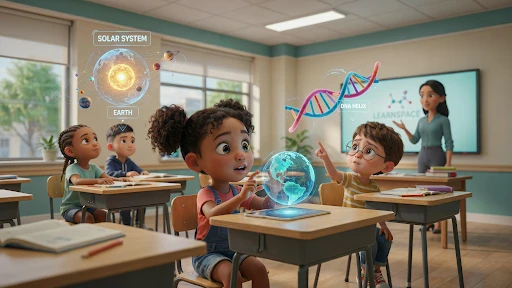
A solar system model needs scale.
A surgical tool needs position.
A chemical reaction needs movement.
A building structure needs depth.
A machine part needs sequence.
A product demo needs internal visibility.
That is where 3D animation services fit well. They can rotate objects, cut through layers, show inside views, slow down motion, and visualize spaces that cannot be filmed easily.
For eLearning, that control is powerful. The instructor is no longer stuck with one camera angle, one diagram, or one real-world demo that moves too fast.
When 2D Is Still the Smarter Teaching Tool
Not every lesson needs 3D.
If the topic is a policy, customer journey, software flow, language lesson, simple math concept, HR training, or soft-skills module, 2D animation services may work better. 2D can be faster, lighter, and easier to revise. It also works well when the learner needs a clear explanation without realistic detail.
Use 3D when the learner needs to understand form, depth, movement, mechanism, or scale.
Use 2D when the learner needs a simple idea, process, or message explained quickly.
The mistake is treating 3D as automatically better. It is not. It is better only when the concept needs it.
3D Product Visualization Helps With Training and Customer Education
Product-based companies often use eLearning to teach customers, sales teams, or support teams how something works.
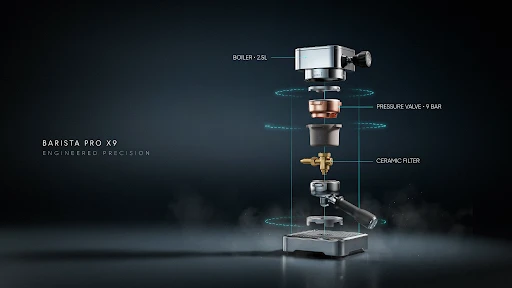
That is where 3D product visualization can help. A physical product can be opened, rotated, labeled, exploded into parts, and shown in use without requiring a camera shoot or a perfect physical sample.
For example, a medical device company can show how a device sits inside the body. A furniture brand can show assembly steps. A manufacturing company can train staff on maintenance. A tech brand can show internal hardware without cutting the product apart.
This is not only useful for education. It also reduces repeated support questions.
The Best Educational Animation Feels Calm
Educational animation should not feel like a trailer.
Fast camera moves, dramatic music, and constant effects may look impressive, but they can make the lesson harder to follow. Learners need time to process what they are seeing.
Good educational 3D usually feels calmer. The motion is clear. The labels appear when needed. The camera moves for a reason. The narration matches the visual. The final frame gives the learner a second to understand before moving on.
A strong 3D explainer video for online course content should make the concept feel easier, not louder.
Put Animation Where Learners Start Getting Lost
Do not add animation to every lesson just because the course needs to “feel modern.”
That gets old fast.
Use it where learners actually struggle. The quiz scores drop. People replay the same section. New hires ask the same question. Customers open support tickets after watching the tutorial. That is the spot where animation can help.
If a machine safety step keeps getting missed, show the hazard. If learners confuse two medical terms, show the body system moving. If people cannot picture how a product fits together, show the parts locking into place.
That is useful animation. Everything else is decoration.
Keep Lessons Shorter Than You Want To
Long animated lessons sound impressive in planning meetings. They are rarely fun to sit through.
Most learners do better with smaller clips. One concept. One process. One mistake. One fix.
That is where an e-learning animation company needs to act less like a video vendor and more like a course partner. A five-minute 3D sequence may look expensive, but a 45-second clip placed at the exact hard part of the lesson will usually teach better.
Short clips are also easier to replace later. Courses change. Policies change. Products change. Nobody wants to rebuild a long lesson because one step moved.
Training Portals Need the Same Explanation Every Time
Corporate training gets messy when every trainer explains things differently.
One person skips the warning step. Another adds too much detail. A new employee watches an old recording. A remote team gets a slightly different version of the same process.
Animation fixes some of that.
A safety sequence, onboarding step, product demo, or compliance process can be shown the same way every time. That consistency is the real value of animated educational video production.
Not glamorous. Very useful.
Certification Content Should Be Plain on Purpose
Certification courses are not brand films.
Learners are there because they need to pass something, perform a task, or prove they understand a process. The animation should respect that.
Show the correct step. Show the common mistake. Show the result. Move on.
A medical module might need a clean anatomy sequence. An engineering course may need a cutaway. A safety course may need the danger zone shown twice from different angles.
This is not the place for wild camera moves or dramatic music. The learner should remember the process, not the production style.
Keep Logo Motion Out of the Way
Branding still matters in eLearning. A university, training platform, corporate academy, or product education portal should feel consistent.
That is where logo animation services can help.
But keep it tiny.
A short opener is fine. A clean closing mark is fine. A long logo reveal before every module is not fine. Learners will resent it by lesson three.
The brand should frame the lesson. It should not make people wait for the lesson.
Different Lessons Need Different 3D Styles
Not every 3D lesson needs a photoreal look.
A heart surgery module may need accurate anatomy. A machine safety clip may only need a simplified model with clear danger zones. A product assembly lesson may need exploded parts. A science course may need molecules, forces, or environmental systems.
There are many types of 3D animation, but the right one depends on the learning problem.
Detailed when accuracy matters.
Simple when clarity matters.
Stylized when attention matters.
Interactive when practice matters.
Do not pay for realism if a cleaner model teaches better.
Product Education Can Save Support Time
Some companies only think about education before the sale. Big mistake.
Customers also need help after they buy.
They get stuck during setup. They assemble something wrong. They miss a safety step. They cannot find the feature. They contact support because the instruction sheet did not do enough.
A short animation can solve one of those problems before the ticket happens.
A furniture brand can show the assembly order. A medical device company can show safe handling. A hardware brand can explain each part. A software product can show the first setup step.
Small, clear lessons save support teams from repeating themselves.
Use Trends Only When They Teach Better
There are always new top animation trends floating around eLearning.
Interactive lessons. AR demos. VR safety training. AI-assisted visuals. Mixed-media explainers. Gamified modules.
Some are useful. Some are expensive noise.
A rotating 3D model may help anatomy students. VR may help workers practice a dangerous task safely. A simple 2D graphic may still be better for a policy lesson.
The format has to earn its place. If the trend does not help the learner understand, practice, or remember, skip it.
Build Assets You Can Reuse
One 3D asset can often do more than one job.
A machine model can support onboarding, maintenance, safety, and sales training. A product model can support customer tutorials, internal training, and support videos. A body system model can support multiple health lessons.
Plan for that.
Create short clips. Save still frames for slides. Make recap visuals. Cut tiny refresher videos. Build clean labeled versions and unlabeled versions.
A reusable asset library is far more valuable than one beautiful lesson that gets watched once and forgotten.
Do Not Show Everything at Once
This is the mistake that hurts learning.
A team builds a beautiful 3D model and wants to show every part, label, layer, and motion in one lesson. The learner gets buried.
Good eLearning animation controls attention.
Show the full object.
Then show one part.
Then show the movement.
Then add the label.
Then repeat the sequence once more.
That rhythm helps people follow the idea. Teaching is not showing everything you know. It is making the next step easier to understand.
Frequently Asked Questions
Final Words
3D animation for eLearning works when it helps learners understand something they were struggling to picture. Anatomy, machinery, product setup, science, safety, engineering, and spatial lessons all become easier when the learner can see movement, depth, sequence, and structure.
The best educational animation is not loud. It is clear. Use 3D when the concept needs space or motion. Use 2D when the idea is simple. Keep clips short. Reuse assets. Put animation where the lesson usually breaks down.
That is how animation becomes a teaching tool, not just a pretty layer on top of the course.
Related Articles: