3D Product Animation for Instructional Videos: When Your Customer Opens the Box Alone
Patrick Mitchell
Table of Contents
There’s a moment your product team never sees. A customer is on the floor of their living room, the box is open, forty parts are spread across the carpet, and the diagram in front of them could mean two different things.
Nobody is there to ask. There’s no trainer, no supervisor, no colleague who did this last week.
What happens next becomes a support ticket, a one-star review about assembly, or a return. None of those show up as a product problem. They show up as a cost, spread across three departments, with nobody owning it.
Key Takeaways
3D product animation for instructional videos works best when it’s aimed at one or two steps, not the whole setup. Completeness isn’t the goal.
Your support tickets already tell you which step people fail on. That data is the brief.
Written instructions break down at the same places every time, and they’re always orientation, order and force.
Some things belong in the manual and should stay there. Part lists and torque figures don’t work as video.
The step customers skip most often is the one that protects them, which makes it the one worth animating first.
Your Support Tickets Already Know Which Step Fails
Most companies commission an instructional video by filming or animating the whole assembly, start to finish. It’s the obvious approach and it’s usually the wrong one.
Setups don’t fail evenly. They fail at one or two specific points, and everything either side of those points is fine. Customers manage the easy steps without help and always have.
So before anyone writes a script, pull the data you already have. Search your support tickets for the product and count which step gets mentioned. Read the reviews that mention assembly and note the word people use when they got stuck. Ask the returns team which reason code comes up. If you run a warranty line, ask what gets reported as broken that was actually installed wrong.
A pattern shows up quickly. It’s usually one step, sometimes two, and it’s rarely the step the engineering team would have guessed.
There’s a reason for that gap. The people who designed the product know how it goes together, so the ambiguous step doesn’t look ambiguous to them. They read the diagram and see the right answer because they already know it. A customer reading the same diagram sees two possible answers and has no way to choose.
That’s your video. Not the full assembly, just the part that costs you money. A three-minute film covering everything buries the answer somewhere in the middle, and the customer who needs it has to sit through two and a half minutes of things they already did correctly.
This is a different job from training staff on a factory floor, which is well covered in3D animation for manufacturing. A worker gets a supervisor and a second attempt. Your customer gets neither.
Why Do Written Manuals Fail at the Same Points?
Manuals are not bad because the writers were lazy. They fail because paper cannot show three specific things.
The first is orientation. A drawing shows one angle. If the part is nearly symmetrical, or if it looks the same flipped, the drawing cannot tell the customer which way round it goes. They pick one, and half of them pick wrong.
The second is order. A numbered list implies sequence, but it does not show why the sequence matters. When step four only works because step two was done a certain way, the list cannot explain that, so people improvise and get stuck later.
The third is force. No diagram conveys how hard to push, how far something should travel, or what the right amount of resistance feels like. Customers either stop too early and leave a part loose, or push too hard and break it.
Translation makes all three worse. An instruction that was borderline in the original language often becomes genuinely ambiguous once it has been through a translation process, because the translator is working from words rather than from the product.
Page count works against you as well. Manuals get compressed to save print cost, and the first thing cut is usually the intermediate drawing that showed how one position became the next. What survives is the start and the end, with the tricky bit in between left to the reader.
There’s an international standard covering exactly this problem. TheIEEE standard for instructions sets out requirements for presenting instructions to a non-skilled audience assembling a product without help from a trainer or supervisor, which is precisely the situation your customer is in on their living room floor.
What Animation Shows That Pictures Cannot
Motion solves all three failures at once, which is why it works where another diagram would not.
Orientation becomes obvious when the part rotates into position rather than appearing there. The viewer sees which face goes where, and there’s nothing left to interpret.
Order becomes obvious when the sequence plays. The customer watches step two create the condition step four depends on, and the reason is visible rather than stated.
Force is the one people underestimate. Animation can show the travel distance, the moment resistance changes, and what correct looks like at the end. A bolt that turns and then stops is information a photo cannot carry.
There’s a fourth thing, and it’s the strongest argument of all. Animation can show the wrong way. A camera cannot film someone breaking a real product, and a manual will not illustrate failure. An animation can show the part going in backwards, what that looks like, and what happens as a result, then rewind and show it correctly. Most customers who get it wrong had no idea wrong was possible.
Camera position matters more here than in marketing work. The useful angle is the one the customer actually has, which usually means looking down at something on the floor or reaching behind a unit against a wall. A beautiful three-quarter view from an angle nobody can physically occupy looks better and helps less.
Building all this means the parts have to move accurately rather than approximately, which is the same discipline behindmechanical animation work generally. If a hinge in your animation moves in a way the real hinge cannot, someone will notice and trust the rest of it less.
The Step People Skip
Every product has one. A step that protects the customer, takes two minutes, and gets left undone because nothing appears to go wrong when it’s missed.
Wall anchoring is the clearest example. Furniture and televisions tip over, and the consequences are severe enough that it has been the subject of a sustained public safety campaign.
The problem is not that the step is hard. It’s that skipping it produces no immediate feedback. The furniture stands up fine. The television sits on the unit. Nothing looks wrong, so the anchor kit stays in the bag.
Video changes that for a reason worth understanding. A manual describes the step. An animation can show the consequence of skipping it, safely, without filming anything alarming. Seeing why turns an optional-feeling step into an obvious one.
If your product has a step like this, animate it first, before anything else in the setup. It’s the highest-value ninety seconds you will commission, and unlike most marketing work, its value is measurable in claims and incidents rather than impressions.
Worth finding the others too. Any step that protects the customer but produces no visible feedback when skipped belongs on the same list. Grounding connections, pressure relief, locking pins, retaining clips. In each case, the product appears to work without the step, right up until it doesn’t.
The anchoring case is worth studying because the messaging has been tested at scale. The CPSC’sanchoring guidance for consumers breaks the job into three steps and stresses how simple it is, and the campaign has been credited with a substantial fall in tip-over injuries and deaths. Simple, short, and focused on one step beats comprehensive.
What Should Stay in the Manual?
This is where most advice stops being useful, because almost everyone in this business will tell you to animate more. Some things genuinely work better on paper.
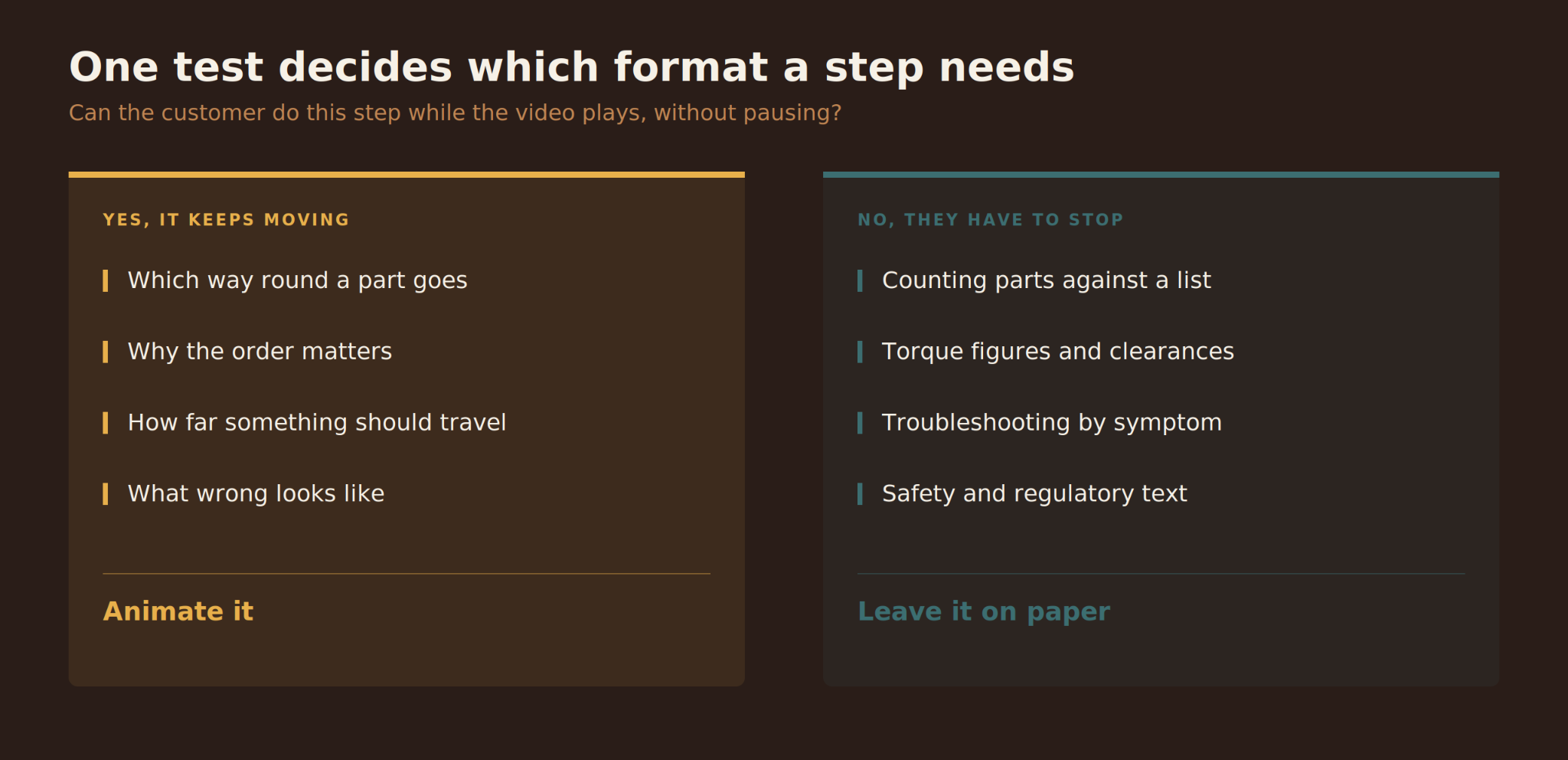
Part inventories belong in the manual. Someone counting forty pieces against a list needs to pause, look away, count again, and come back. Video is the wrong format for anything a person has to hold still and check against.
Exact figures belong in the manual. Torque settings, clearances, dimensions, part numbers. A number that has to be read precisely should not be something the viewer has to scrub backwards to catch.
Troubleshooting belongs in the manual, or better still on a searchable page. People arrive at troubleshooting with a specific symptom and need to jump straight to it. Making them watch is the opposite of helpful.
Safety and regulatory text belongs in the manual, in writing, in whatever form your compliance team requires. Video can support it. It cannot replace it.
What’s left is the moving, spatial, sequential part of the job, and that’s what the animation should cover. The two formats do different work, and a good instruction set uses both rather than choosing.
A useful test when you’re deciding: can the customer do this step while the video plays, without pausing? If yes, video suits it. If they need to stop, count, look something up, or compare against a number, paper suits it better. Any studio doing industrial animation services work should be willing to tell you which of your steps fail that test, rather than quoting for all of them.
Where Does the Video Need to Live?
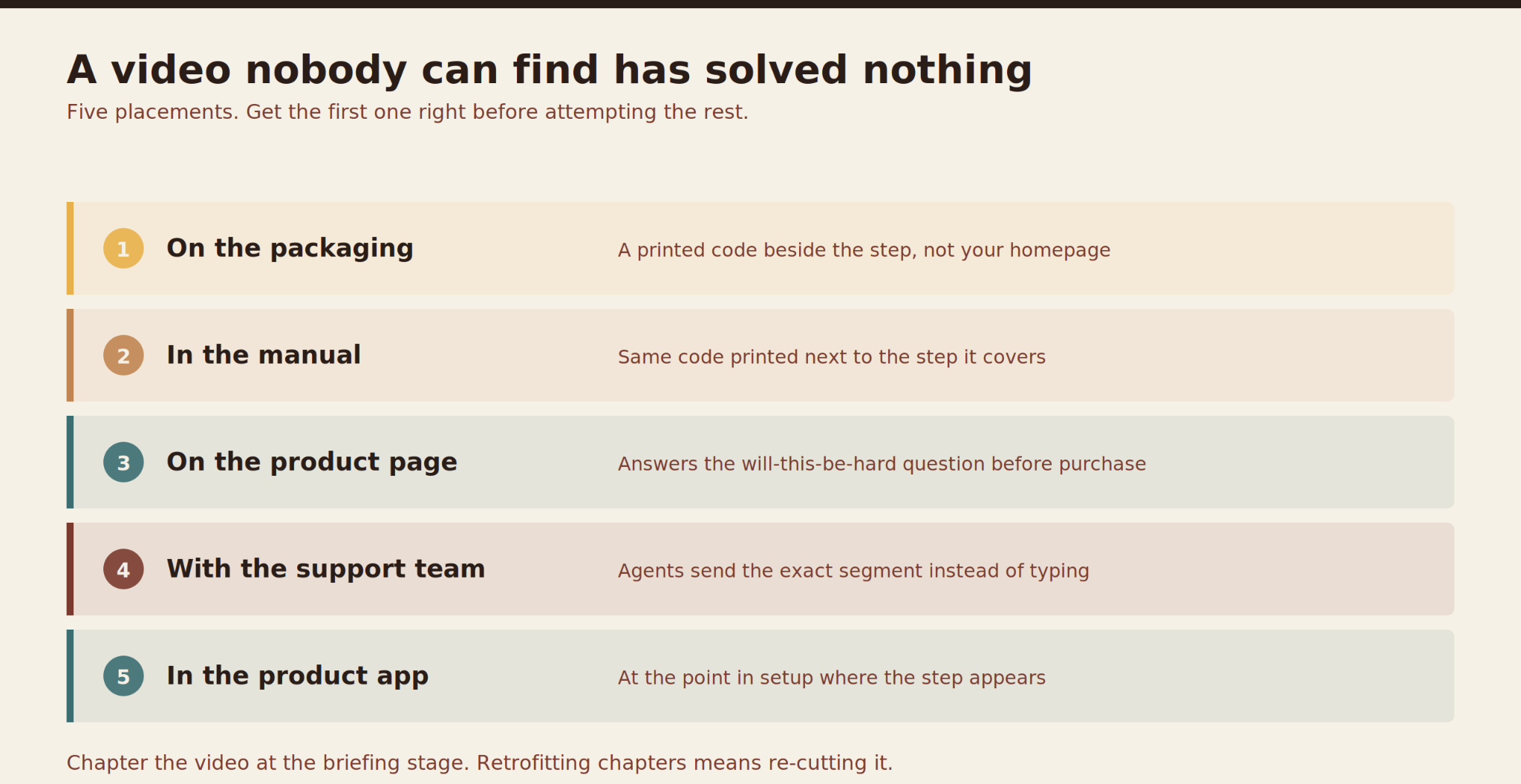
A video the customer cannot find has not solved anything, and this is the part that gets decided too late.
On the product itself or its packaging, a printed code linking straight to the step. Not to your homepage, not to a playlist, to the step.
In the manual, the same code printed beside the step it covers, so someone already reading the page can jump across.
On the product page, so the video answers the pre-purchase question of whether this is going to be difficult. That has a second benefit worth noting. A setup video on the product page reduces returns from people who bought something they were never going to manage.
In your support team’s hands, so an agent handling a ticket can send the exact segment instead of typing an explanation.
And in whatever app ships with the product, if there is one, at the point in setup where the step appears rather than buried in a help menu.
Pick one of those to get right first rather than doing all five badly. The printed code on the packaging is usually the one, because it reaches the customer at the exact moment they are stuck, which no other placement does.
That last point about support is where the saving usually shows up first. It also changes the brief, because a video meant to be linked from a support ticket needs to be chaptered, with each step reachable on its own. Deciding that upfront costs nothing.
Instructional content has a longer life than marketing content, and that changes the economics.
Most setup animations carry very little spoken word. The picture is doing the work. That makes them far cheaper to localize than a talking-head video, because often only the on-screen labels change. If you sell into several markets, say so at the briefing, and the studio can build the text so it can be swapped without rebuilding the shots.
Product revisions matter too. A physical product changes over its life, and a fastener change or a new bracket can make the video wrong. Ask how the file is structured so a single step can be re-rendered later without redoing the whole thing.
Final Words
The instinct with instructional video is completeness. Cover every step, leave nothing out, and the customer will have everything they need.
In practice the opposite works better. Find the one or two places people actually get stuck, animate those properly, leave the rest where it already works, and make the result easy to reach at the moment of confusion.
That’s a smaller project than most companies expect, and it’s measurable. You’ll see it in ticket volume for that product, in assembly mentions in reviews, and in returns coded as too difficult.
It also tends to be the rare piece of content that keeps paying. A marketing video has a campaign life. A setup animation keeps working for as long as the product ships, quietly removing the same conversation from your support queue every week.
If you have a product with a setup step that keeps generating tickets, the team at Prolific Studio, a top animation video production company in the USA, can look at where the failure sits before anything gets scoped.
Frequently Asked Questions
How long should an instructional animation be?
Shorter than you’d think. If it’s covering one step, thirty to ninety seconds is usually right. If it covers a full assembly, chapter it so each step can be reached on its own, because almost nobody watches a setup video start to finish. They arrive stuck at step six and want step six.
Should the video replace the printed manual?
No, and they shouldn’t. They’re doing different jobs. Part lists, exact figures, troubleshooting and regulatory text work better in writing. Orientation, sequence and force work better in motion. In most regions there are obligations about what ships with the product, so it’s an addition rather than a substitute.
What do you need from us to make one?
Design files for the parts, the current manual, and your support data on which step fails.
Can you show the wrong way to do something?
Yes, and it’s often the most useful shot in the whole video. Showing a part going in backwards, and what that causes, teaches faster than showing only the correct version. Keep it brief and always end on the right way, so the last thing the viewer sees is what they’re meant to copy.
How do we know whether it worked?
Measure before you commission, because afterwards you won’t have a baseline. Take ticket volume for that product, the share of reviews that mention assembly, and returns coded as difficulty. Check the same numbers three months after the video goes live and is properly linked. If it’s buried on a playlist nobody reaches, you’re measuring the placement rather than the video.
Patrick Mitchell is an animation expert at Prolific Studio, with expertise in 2D and 3D animation, motion graphics, VFX, and visual storytelling. With knowledge across industries including healthcare, technology, education, entertainment, finance, and product development, he explores how animation turns complex ideas into engaging visual experiences. Through his insights, Patrick Mitchell shares practical perspectives on animation, creative trends, production techniques, and digital innovation.