You draw a tiny blue ball, move it down a few pixels, and hit Play. Instead of bouncing, it seems to teleport. Another frame fixes the jump but makes the landing feel oddly slow. That little experiment gets to the heart of pixel art animation: drawing the object is only half the job. Where you place each pose, and how long it stays on screen, determines whether anyone sees a bounce at all. Let’s make one from scratch.
This guide uses a six-frame bouncing ball because it exposes the decisions you will later make for a walk cycle, a blinking character, or a moving game object. You can follow along in Piskel or Aseprite. Piskel is a free browser editor with a live preview; Aseprite’s timeline lets you change the duration of individual frames.
Ready to Bring Your Creative Ideas to Life?
From pixel-inspired visuals to polished animated stories, Prolific Studio transforms creative concepts into engaging visual experiences with professional animation services.
Step # 1: Set Up a Small Canvas
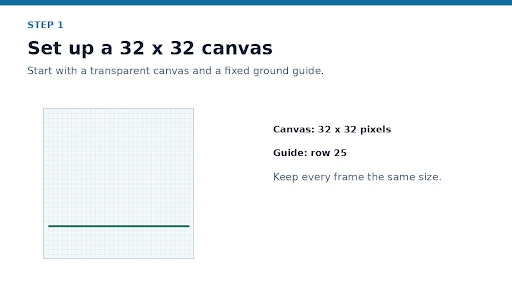 Create a 32 × 32-pixel canvas with a transparent background. Zoom in enough to place individual pixels, but occasionally view the image at its actual size. If your editor has a grid, turn it on and mark a temporary ground line near row 25. Put that guide on a separate layer if possible, so you can hide it before export.
You need only three colors for the ball: a main blue, a darker outline, and a small highlight. A compact palette makes it easier to keep the ball consistent across frames.
Step # 2: Draw the Impact Pose
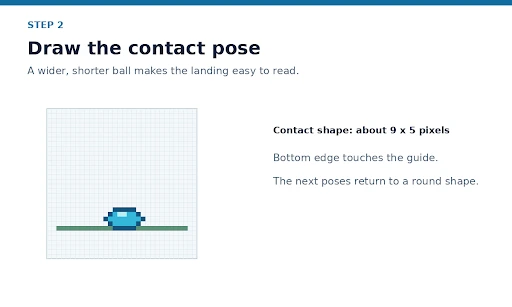 Start with the moment the ball hits the ground. Draw a flattened shape about 9 pixels wide and 5 pixels high, with its bottom touching your guide. Give it the same dark outline you will use in the other frames. This wider contact pose gives the landing its impact; a perfectly round ball in every frame would make the action harder to read.
Check the silhouette before adding the highlight. If the shape still reads as a squashed ball in one color, it is ready to animate.
Step # 3: Add the Other Five Frames
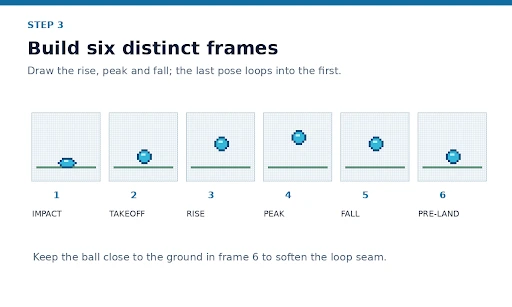
Duplicate the first frame, then draw the remaining poses on the same 32 × 32 canvas. Aseprite’s onion skinning can show nearby frames faintly while you work, which helps you judge the ball’s position.
| Frame | Pose | What changes |
| 1 | Impact | The ball is wide and flat on the ground. |
| 2 | Takeoff | It becomes round and lifts slightly. |
| 3 | Rise | It moves substantially higher. |
| 4 | Peak | It moves a smaller distance and reaches its highest point. |
| 5 | Fall | It starts downward. |
| 6 | Pre-landing | It nears the ground, ready to return to frame 1. |
Make the round ball about 7 × 7 pixels. Don’t move it the same distance in every frame: smaller gaps near the peak suggest slower movement, while larger gaps make the rise or fall feel faster. Play all six frames in order, including the jump from frame 6 back to frame 1.
For a character with several actions, the same pose-first approach still applies. If that grows into a production brief, character animation services can help turn a consistent design into a broader set of movements.
Step # 4: Adjust the Timing
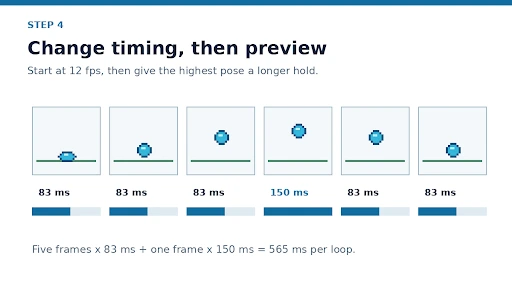 Set the initial playback to 12 frames per second. Six equally timed frames then last 0.5 seconds: 6 ÷ 12 = 0.5. For context, Adobe Animate’s default document rate is 24 fps; neither number is a rule for every pixel-art project. The useful choice is the one that makes your action readable.
Try holding frame 4, the highest pose, slightly longer than the others. For example, five frames at 83 milliseconds and the peak at 150 milliseconds make a 565-millisecond loop. That is a deliberate timing change, not an extra drawing. In Aseprite, select a frame and use Frame > Frame Properties to adjust its duration.
Preview the animation at normal size. If the ball seems to pause on its way up, reduce the hold. If the impact passes unnoticed, keep the squashed pose on screen a little longer. Change one duration at a time so you can see what improved the motion.
For a longer scene with several moving elements, 2D animation services can help develop that timing across the whole sequence.
Step # 5: Clean Up the Pixels
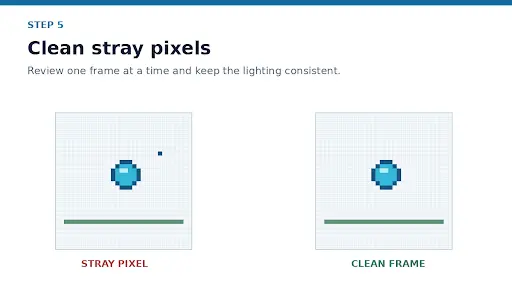
Stop playback and inspect each frame. Look for a single stray pixel outside the ball, an outline that changes thickness, or a highlight that switches sides for no reason. These details can look like flicker once the loop runs.
Then watch the landing. If frame 6 sits too high, lower it so its move into the squashed first frame feels connected. Keep the ground guide in the same position throughout. If you added a shadow, it should remain anchored to the ground rather than travel upward with the ball.
Step # 6: Save and Export
Save an editable project file first. Then export according to where the animation will go:
- Animated GIF for a quick looping preview.
- PNG sprite sheet when software will play the frames from one image.
- Numbered PNG files when you need each frame separately.
Six 32-pixel-wide frames in a horizontal row make a 192 × 32-pixel sprite sheet, provided you export without padding or trimming. Aseprite documents GIF and numbered PNG exports as well as its File > Export Sprite Sheet command. Piskel also supports GIF and PNG sprite sheet export.
When displaying the sprite larger, choose nearest-neighbor or pixelated scaling so the edges stay sharp.
If the loop is destined for a larger game with multiple actions and assets, game animation services can help plan the art and delivery requirements. Bring your target sprite size, action list, reference style, and required export format to the brief.
Transform Simple Frames into Engaging Stories
Have an animation idea in mind? Prolific Studio creates compelling 2D animations that help businesses communicate their message, capture attention, and stand out.
A Quick Recap
Your first pixel art animation does not need dozens of frames. Draw poses that clearly show the action, control how far the object moves between them, and test the timing before you polish every pixel. The bouncing ball gives you a repeatable method: make the impact and peak readable, fix the loop seam, clean the details, then export for its destination.
If you are looking for creative professionals to do the hard work and turn your vision into attractive pixel art, then get in touch with a reputable animation studio in the US.
Related Articles:
Frequently Asked Questions
2. How many frames do I need for a pixel art animation?
There is no fixed count. This exercise uses six because each frame has a clear job: impact, takeoff, rise, peak, fall, or pre-landing. If the loop feels jumpy, first inspect the spacing and the transition back to frame 1. Add another drawing only where the action is genuinely hard to follow.
3. What fps should I use for pixel art animation?
Use 12 fps as a starting test for this ball, then preview it at the size and speed at which people will see it. Frame rate alone does not decide how polished the animation feels: you can also hold an individual pose longer. Aseprite lets you change frame duration without adding a new drawing.
4. Why does my pixel art animation look jerky or flicker?
Check the loop seam first: does the last pose lead into the first? Next, compare the ball’s position and outline across adjacent frames using onion skinning. If the movement works but the image still flickers, look for stray pixels or highlights that change position between otherwise similar poses.
Should I export a GIF or a sprite sheet?
Use a GIF when you want someone to watch and review the loop quickly. Use a sprite sheet when a game or another application needs the frames laid out in a predictable order. Keep the editable project file as well; an export is the delivery copy, not the version you want to revise later.