3D Product Animation for Displays and TVs: What to Show When You Can’t Show the Picture
Javeria
Table of Contents
A flagship television and a cheap one look identical when switched off. Both are a black rectangle.
Switch them on and the difference is obvious in a showroom. Put that difference in a video and something strange happens. The video plays on the viewer’s laptop, or their phone, or a monitor that cost two hundred dollars. Whatever your panel does, they are not seeing it.
That is the honest starting point for any launch video here, and it’s why the rest of the product has to sell.
Key Takeaways
3D product animation for displays and TVs has one hard limit. Your video plays on somebody else’s screen, so it can never prove how good yours is.
That is why every television ad carries a “simulated image” line in the corner.
Everything other than the picture has to carry the work: the edge, the back, the ports, the stand.
The back panel is the most skipped shot and one of the most useful.
Build one model and get every size and finish from it. Decide that at the start.
What Goes on the Screen?
cannot.
The first decision is also the one that causes the most trouble later. Something has to be showing on that screen in every frame.
Real content is the obvious answer and the worst one. A film clip needs a license. A sports broadcast needs a license. A game needs permission from the publisher, and that permission usually comes with conditions about how the footage is presented. Teams discover this late, and then a finished animation has to be reworked because legal will not clear the footage on it.
Commissioned abstract content is the usual answer. Color fields, slow-moving landscapes, macro nature footage, generated visuals. It’s safe, it’s cheap, and it’s forgettable, which is why every display video in the category looks the same.
There’s a practical trap in it too. Abstract content tends to be smooth and slow, which flatters any panel. A viewer who has seen forty of these videos has learned to ignore whatever is on the screen, because it never tells them anything. You’ve spent frames on something your audience has trained themselves to skip.
The middle option is content designed to demonstrate something specific. If your claim is about contrast, the content should be a scene with deep shadows and small bright highlights. If it’s about motion handling, the content needs fast movement. Pick the content to serve the claim, rather than choosing something pretty and hoping.
Whatever you pick, the disclaimer matters. The FTC judges an ad by how a reasonable person reads it, taking the words and the pictures together, and itsguidance for businesses is clear that a disclaimer on its own doesn’t rescue a claim the images have already made. If the on-screen footage implies a picture quality your panel does not deliver, small print in the corner is not a fix.
The Bezel Is the Real Hero Shot
Here’s the shot that actually works, and it’s the one thing a camera struggles to get.
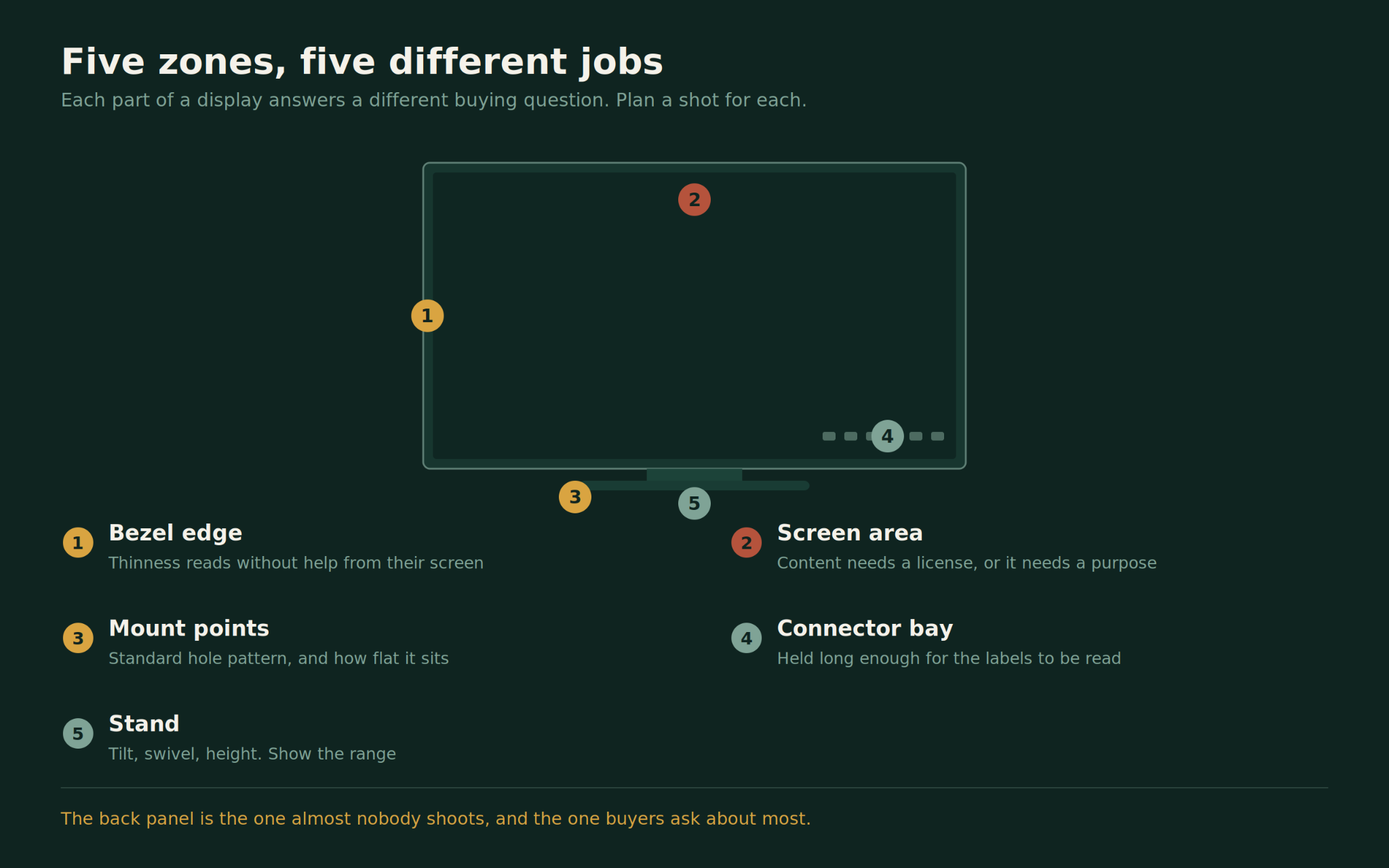
A display’s edge is thin. On a modern panel it can be a few millimeters. That thinness is a genuine engineering achievement, it’s visible, and it doesn’t depend on the viewer’s own screen to land.
To shoot it properly with a camera you need the panel at an extreme angle, lit so the edge separates from the background, with nothing reflecting in the glass. Screens behave like mirrors. Every light, every stand, every person in the room shows up in them, and removing all that afterwards is slow and expensive.
In animation none of that exists. The camera can sit anywhere, including positions no physical rig would reach. There are no reflections you didn’t put there. There’s no dust and no fingerprints.
The trap is overdoing it. A camera move that swoops through impossible space reads as a render, and the moment a viewer thinks “that’s CGI” they stop reading the product as real. Restraint sells better than acrobatics here. Move slowly, keep the move physically plausible, and let the edge do the work.
It helps to give the eye something to measure against. A bezel described as thin means nothing on its own. Next to a coin, a pen or a hand it becomes a fact the viewer can check. Scale references are cheap to add and they turn a claim into evidence, which is more than most launch videos manage.
This is one of the clearest cases where 3D product animation services are not a substitute for photography but a different tool. You’re not recreating a photo you could have taken. You’re getting a shot that was never available.
Why Does the Back Panel Matter More Than You Think?
Almost nobody shoots the back. Almost every buyer sees it.
A television spends its life against a wall, and a monitor spends its life on a desk with cables running out of it. The back is the part people live with, and it is where several purchase decisions are actually made.
Wall mounting is the big one. Buyers want to know the screen will fit the bracket they already own, or the one their installer is going to supply, and they want to know how far off the wall it ends up sitting. Showing the mounting points, and showing the panel flat against a wall once mounted, answers both without anyone having to go hunting through a manual.
Cable routing is the second. Anyone who has mounted a screen knows the moment where the cables ruin it. If your design solved that, with a channel in the stand or a recessed connector bay, the back panel shot is where you prove it.
There’s a third reason, and it’s about trust. A well-finished back suggests a well-made product. A messy one suggests corners were cut where you cannot see. Brands that put effort into the back should show it, because almost none of their competitors will.
If you do build this shot, get the mounting detail right rather than approximate. Hole patterns follow a published specification, and thedisplay mounting standard maintained by VESA sets out the spacing and screw sizes that bracket manufacturers build against. An animation showing a pattern that doesn’t match what ships is a small error with a long tail of support emails.
The Ports Are Where B2B Buyers Look First
Consumers skim the ports. Business buyers go straight to them.
If you’re selling into conference rooms, classrooms, hospitals, control rooms or digital signage, the person deciding is working through a compatibility list. How many inputs. Which versions. Whether it can be powered and fed over one cable. Whether it will drive a second screen. Whether there’s a network port for remote management.
A close pass along the connector bay, held long enough to read the labels, answers all of that in four seconds. It’s an unglamorous shot and it converts.
The same shot does a second job in retail. Someone standing in front of a wall of screens is often trying to work out whether this one takes the cable they already have at home. A clear view of the inputs settles that faster than a spec card stuck to the shelf.
It’s also the shot that ages best. Panels get replaced every year or two, but the connector layout on a given model stays fixed for its whole life, which means the footage stays accurate long after the marketing copy around it has been rewritten. For a product family that ships across several years, that is a rare thing.
Two production notes. Port labels are tiny, and they only read if the shot is built for them, which means a tighter lens and more surface detail than the rest of the video needs. And ports change between regional variants, so confirm which version each market gets before the shot is built rather than after.
The Stand, the Desk and the Room
A display is never used on its own, which makes the setting part of the product story.
For a monitor, the desk says who it’s for. A tidy desk with a document open says office. Two screens, a keyboard with wrist rest and a plant says home working. A dark room with a mechanical keyboard and colored lighting says gaming, and gaming buyers read that context instantly. The same panel sells to three different people depending on what surrounds it.
For a television, the room does the same job. A bright family living room, a dim room set up for films, a small apartment where the screen has to fit a narrow wall. Each one answers a different buying question, and each one reaches a different buyer.
Get the scale right, because this is where these shots usually fail. A screen that reads as too large for the room it sits in looks wrong even to someone who could not tell you why, and it quietly undermines the whole video. Model the furniture at true size and check the sightline from where a person would actually sit.
This is where animation pays for itself twice over. Building the product once and dropping it into three rooms costs far less than three photo shoots in three locations, and you can change the room later without touching the product. Adjustability is worth showing too. If the stand tilts, swivels, pivots to portrait or raises and lowers, show the range rather than listing it.
How Do You Show Twelve Sizes Without Twelve Builds?
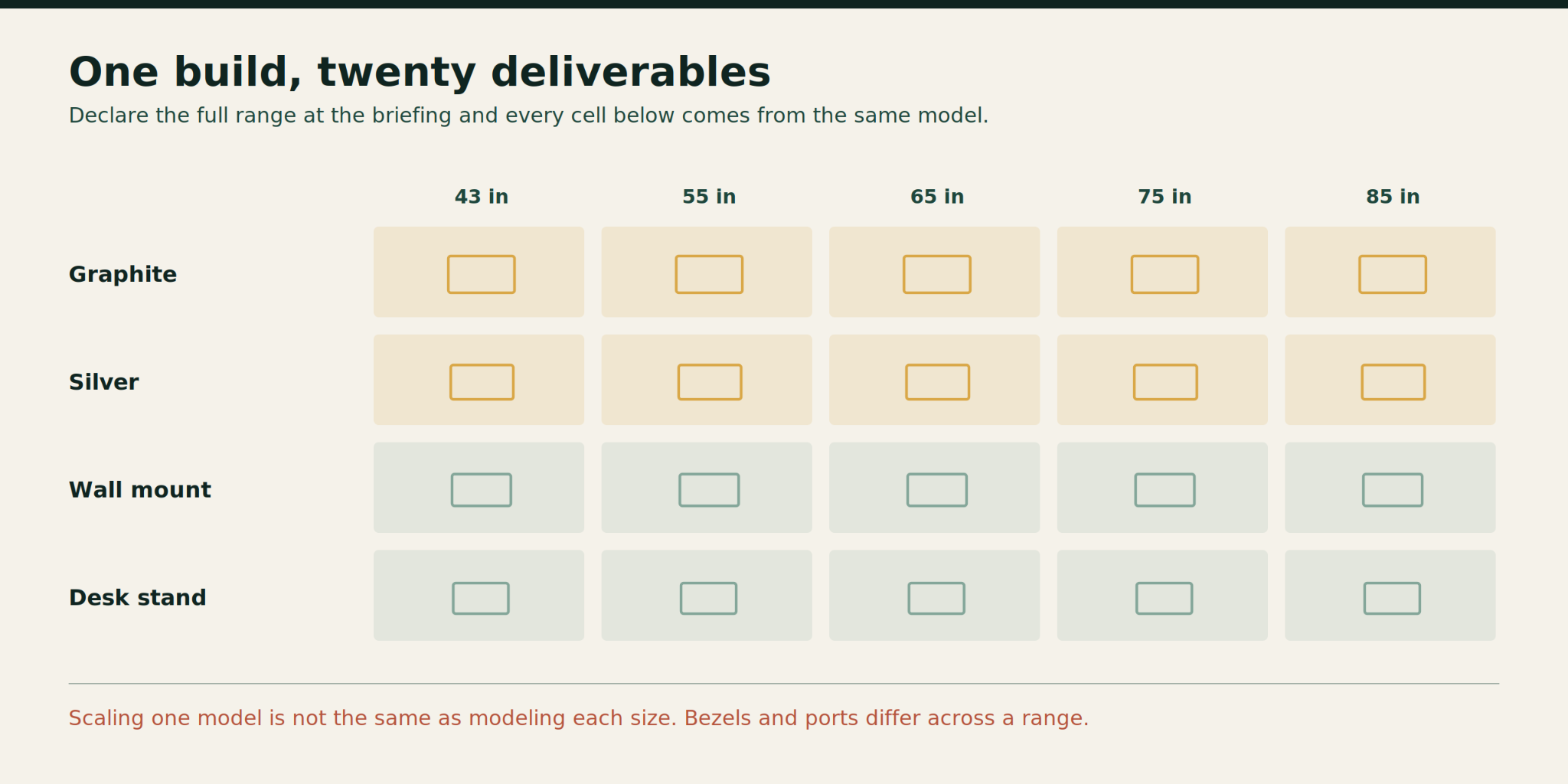
Displays ship as ranges. Four sizes, two finishes, three stand options, and regional differences on top.
Handled properly this is cheap. The panel geometry scales, the materials carry across, and the lighting setup is reused. Handled badly it becomes twelve separate jobs.
The difference is deciding upfront. Tell the studio the full range at the briefing stage and the model gets built so that size and finish are switchable. Ask for the other eleven after the first one is approved and much of the work gets redone, because the file was built for one product rather than a family.
One warning. Scaling a model is not the same as modeling each size. Bezel proportions, stand thickness and port positions often differ across a range, and a stretched 55-inch model presented as the 85-inch is inaccurate in ways that specialist reviewers will spot.
Regional variants deserve the same care. Power connectors, tuner types and included stands vary by market, and a single global asset that quietly shows the wrong plug will be noticed by somebody. Ask which markets the video is running in before the first render, not after the first complaint.
Packaging is worth raising at the same time. Retail boxes, quick-start cards and shelf displays all pull from the same model, and if they’re on the list from the start the renders come almost free. Commissioned separately three months later, they become a second project.
Rendering time is the other half of the cost, and it scales with how many versions and how many rooms you need. Sorting out where that time goes is worth a conversation early, and thecost of real-time rendering is a useful place to start if you’re weighing that against traditional rendering.
Pick the One Thing the Screen Cannot Say
Every display launch has the same temptation, which is to cram the whole specification sheet into ninety seconds. Panel type, refresh rate, brightness, ports, stand, sound, software, warranty.
Put all of it in and the viewer keeps none of it.
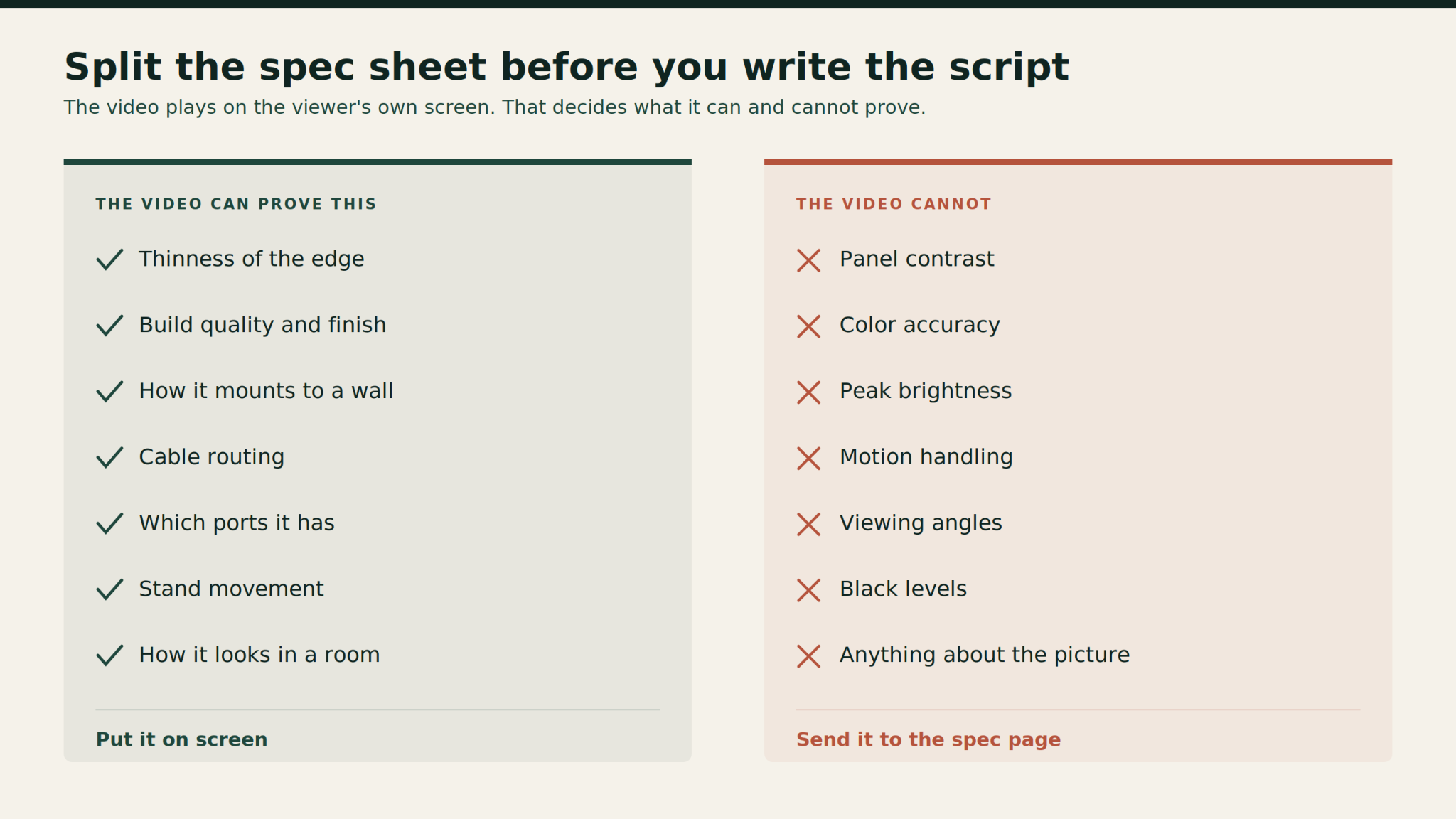
The useful discipline is to separate what the video can prove from what it cannot. Picture quality cannot be proven on video, so it belongs on the spec page and in reviews. Thinness, build quality, mounting, connectivity, adjustability and how the product looks in a real room can all be proven, and those are the video’s job.
Choose one of those to lead with. Support it with two others. Leave the rest to the product page, where numbers work properly and nobody is scrolling past.
A useful check before signing off a script: read it back and mark every claim the finished video will actually demonstrate on screen. If most of the script survives that test, you have a product video. If most of it doesn’t, you have a spec sheet with music.
The brands that do this well tend to look narrower than their competitors on paper and land harder in practice. One clear idea, proven on screen, beats eight features mentioned in passing. That is true in most categories and it is especially true here, where the headline feature is the one thing the format refuses to carry.
If you have a launch coming and want a view on which parts of your display will actually carry a video, the team atProlific Studio, a top animation video production company in the USA, can work through it with you before anything is committed.
Frequently Asked Questions
Why do TV ads say “simulated image”?
Because the ad is being watched on a different screen from the one being adised. Whatever your panel does, the viewer sees it reproduced by their own device, compressed for delivery, and adjusted by their own settings. The disclaimer acknowledges that the picture on screen isn’t a direct demonstration. It’s worth remembering that a disclaimer doesn’t cure a misleading impression the images have already created.
Can a 3D animation show picture quality at all?
Not honestly, no. It can show the effect of a feature in a stylized way, such as a scene brightening or shadow detail appearing, but that’s an illustration rather than a demonstration. Treat it as explaining what the feature does, and keep any wording carefully separate from a claim about what the viewer is currently seeing.
What is the most overlooked shot for a display?
The back panel. Mounting points, cable routing and how close the screen sits to the wall answer real buying questions, and hardly any competitor bothers to show them.
Is animation cheaper than photographing a monitor?
Usually, once you need more than one setting. Screens are reflective, which makes them slow and costly to light and retouch, and each new room means another shoot. With a model built once, extra rooms and extra finishes are comparatively inexpensive. For a single hero image with no variants, photography can still win.
How early should we tell you about the full product range?
At the first briefing. Whether the model is built for one product or for a family changes how it’s constructed. Adding sizes, finishes and stand options afterwards means redoing work that could have been planned in from the start, and that’s the most common avoidable cost in this category.
Javeria is an animation expert at Prolific Studio, with expertise in 2D and 3D animation, motion graphics, VFX, and visual storytelling. With knowledge across industries including healthcare, technology, education, entertainment, finance, and product development, she explores how animation turns complex ideas into engaging visual experiences. Through her insights, Javeria shares practical perspectives on animation, creative trends, production techniques, and digital innovation.