3D animation for manufacturing works because factories are full of things that are hard to explain with photos, PDFs, or one rushed floor demonstration. A machine cycle. A hidden part. A lockout step. A product assembly sequence. A robotic cell. A safety hazard that only appears when someone stands in the wrong place at the wrong time.
Why 3D Animation for Manufacturing Is More Than a Nice Visual
Manufacturing teams do not need animation because it looks modern. They need it because bad explanations create real problems.
A new operator misunderstands a machine cycle.
A technician skips one step in assembly.
A buyer cannot see how the product works from a spec sheet.
A sales team explains the same mechanism five different ways.
A safety trainer shows a hazard too late, after the worker is already near the equipment.
That is where 3D starts earning its place. It shows sequence, movement, and risk before someone is standing next to the actual machine.
A good animation studio should not treat manufacturing animation like a glossy product ad. It should ask what the viewer needs to understand, what mistake they are likely to make, and what part of the process must be shown clearly.
Training Gets Easier When Workers Can See the Process First
A shop-floor explanation can be useful, but it has limits.
The trainer may be busy. The machine may be running. The new employee may be nervous. The safest angle may not be the best viewing angle. And some steps happen too quickly to explain while the equipment is moving.
Animation slows the process down.
It can show the machine from the side, top, inside, and cutaway view. It can pause at the exact point where a worker needs to pay attention. It can color-code parts. It can isolate one movement instead of forcing the trainee to watch everything at once.
That is why product assembly animation is so useful for onboarding. Instead of handing a worker a manual and hoping the diagrams make sense, the company can show how the part fits, where pressure is applied, what order the steps follow, and what a wrong assembly looks like.
Safety Training Needs More Than Posters
Manufacturing safety is not abstract. A moving part can crush, cut, burn, or blind someone. OSHA’s machine guarding overview says moving machine parts can cause severe workplace injuries, including crushed fingers or hands, amputations, burns, or blindness, and that safeguards are essential for protection.
That is not the kind of message you want buried in a dull slide deck.
A 3D safety animation can show the danger zone without putting anyone near it. It can demonstrate what happens when a guard is missing, where a hand should never go, how stored energy is released, or why a lockout step matters.
This is where industrial animation video production becomes practical, not decorative. It gives the safety team a repeatable asset. Every worker sees the same sequence. Every shift gets the same explanation. Every trainer has the same visual standard.
Engineers Need Detail Without a Messy Presentation
Engineers do not want a cartoon version of the machine. They want the mechanism shown correctly.
That does not mean the animation has to include every bolt, bracket, cable, and surface texture. It means the movement has to make sense. The tolerances, direction, sequence, and part relationships need to be respected.
That is where 3D technical animation for engineers is different from a general marketing video. It can show exploded views, cross sections, fluid flow, torque paths, robotic arms, control points, and assembly logic without turning the screen into visual clutter.
The point is not to impress engineers with style. The point is to stop wasting their time.
Sales Teams Use 3D to Explain the Product Faster
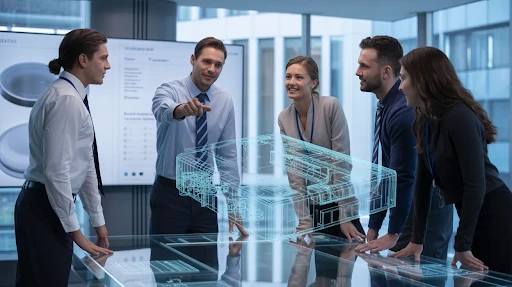
Manufacturing sales can get stuck when the buyer cannot picture the value.
A brochure may list features. A sales rep may explain the process. A CAD screenshot may show the product shape. Still, the buyer may not fully understand why the system is faster, safer, easier to maintain, or better built than the cheaper option.
That is where 3D animation services help. A video can open the product, move through the mechanism, show the assembly, compare old versus new workflow, and make the advantage obvious.
This matters for contract bids too. Procurement teams may not have time to decode every technical document. A clear animation helps them understand the offer before the meeting gets buried in specs.
Different Manufacturing Problems Need Different Animation Styles
Not every factory video should look the same.
That is why understanding the types of 3D animation matters before production starts. A training animation may need slow pacing and labels. A sales animation may need cleaner staging and stronger product framing. A safety animation may need danger zones, warning colors, and step-by-step sequence. A technical engineering video may need cutaways, measurements, and accurate motion.
A product launch video can be more polished.
A maintenance video should be plain and useful.
A safety animation should be impossible to misread.
A bid-support animation should make the buyer’s decision easier.
The style should come from the job, not from whatever looks impressive in a reel.
The Pipeline Has to Start With Technical Truth
Manufacturing animation goes wrong when the creative team guesses.
The 3D animation pipeline should start with real source material: CAD files, product photos, engineering notes, safety procedures, machine manuals, process diagrams, site photos, and review calls with people who actually know the equipment.
Then the animation team can simplify.
That order matters. Start accurately, then simplify. Do not start vague and hope the technical team fixes it at the end.
A good pipeline usually moves through discovery, script or outline, storyboard, technical review, modeling, animation, safety or engineering review, rendering, final edits, and delivery formats.
The review steps are not annoying extras. They are what stop the video from becoming beautifully wrong.
Maintenance Training Is Where Animation Quietly Pays Off
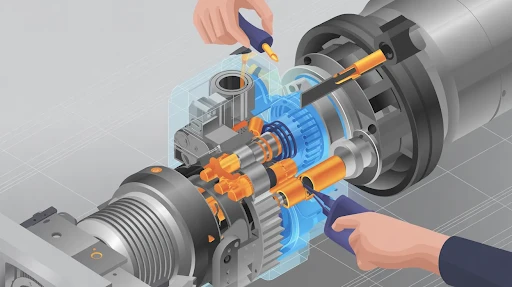
Maintenance is not glamorous, but it is where small mistakes get expensive.
A technician may know the machine well, but a new hire may not. A replacement part may look simple until someone installs it in the wrong order. A service step may feel obvious to an engineer and confusing to the person doing it on a loud shop floor.
That is where animation helps.
A short maintenance clip can show which panel opens first, which part gets removed, where the tool goes, what should not be touched, and how everything returns to position. It can slow down a step that happens too quickly in real life. It can also remove surrounding parts from the view, so the worker sees only what matters.
A good product assembly animation does the same thing. It does not try to impress the viewer. It tries to stop mistakes before they happen.
Safety Refreshers Need to Be Short and Direct
Nobody wants a 25-minute safety video that feels like punishment.
Shorter animations usually work better for refreshers. One hazard. One process. One mistake. One correct action. Done.
For example:
A lockout step before maintenance.
A pinch point on a moving arm.
A forklift blind spot.
A conveyor hazard.
A chemical handling step.
A wrong lifting position.
The best safety videos do not overload workers with theory. They show the danger clearly, then show the correct behavior. That is where industrial animation video production works well. It gives teams repeatable training content without needing to recreate dangerous situations on the actual floor.
Engineers Need Accuracy, Not Drama
A video for engineers should not feel like a product commercial with bolts attached.
Engineers usually want the animation to get to the point. Show the movement. Show the tolerances where needed. Show the sequence. Show the failure point. Show the fix.
That is why 3D technical animation for engineers has to stay disciplined. It can still look clean, but it should not bury the useful information under cinematic camera moves.
If a bearing, bracket, valve, sensor, or robotic arm is important, show it properly. If a part is not important, do not waste ten seconds admiring it.
Technical audiences respect clarity.
2D Still Works for Process Training
Not every manufacturing video needs 3D.
Some topics are better handled with 2D animation services. A safety policy, onboarding checklist, quality-control flow, compliance reminder, or internal process can often be explained faster with flat graphics, icons, and simple motion.
2D is also easier to revise when the process changes. If the message is mostly about steps, rules, roles, or communication, 2D may be the smarter format.
Use 3D when the physical machine matters.
Use 2D when the process matters more than the object.
That one decision can save a lot of budget.
Branding Should Not Get in the Way
Manufacturing videos still need brand polish, especially for trade shows, sales decks, and proposal packages. But branding should not slow down the explanation.
That is where logo animation services can help in a small, controlled way. A clean logo motion at the start or end gives the video a finished feel. It also makes different clips feel connected across a campaign.
But keep it short.
Nobody watching a maintenance video wants a long logo reveal. Nobody reviewing a technical bid wants ten seconds of glowing lines before the equipment appears.
The machine, process, or safety step should stay in front.
Top Animation Trends Are Useful Only if They Fit the Factory Floor
There are always new visual styles floating around. Real-time rendering. mixed media. interactive demos. AR support. AI-assisted previsuals. cleaner product loops. more cinematic machinery shots.
Some of these top animation trends are useful for manufacturers. Some are not.
A factory team does not need a trendy video. It needs one that solves the problem. If real-time 3D helps create faster product variants, use it. If AR helps a technician identify parts on-site, great. If a simple cutaway animation explains the machine better than a high-end cinematic scene, choose the cutaway.
Trends should support the goal. They should not become the goal.
Frequently Asked Questions
Final Words
3D animation for manufacturing helps companies train staff, explain equipment, reduce mistakes, and make stronger sales or contract presentations. It works because it shows what manuals, photos, and live footage often cannot: hidden parts, machine movement, safety risks, assembly order, maintenance steps, and technical logic.
The strongest manufacturing animations are not the flashiest ones. They are the ones that make a process easier to understand and harder to get wrong.
Related Articles: