

Animation is an art form that transforms still images into engaging visual experiences. However, creating smooth and natural movement is not always easy, especially when animators need to draw multiple frames while maintaining consistency in character poses, expressions, and motion flow. This is where onion skinning becomes one of the most valuable techniques in the animation industry.
Whether you are a beginner learning the basics of animation or a professional animator working on complex projects, onion skinning can significantly improve your workflow. It helps artists see previous and upcoming frames while creating a new frame, making it easier to maintain accurate movement and create professional-quality animations.
At Prolific Studio, our team uses creative techniques and advanced animation workflows to develop engaging visual stories for businesses, brands, and audiences worldwide. Our expertise in 2D animation services helps transform ideas into visually appealing animations that communicate messages clearly and effectively.
In this guide, we will explore what onion skinning is, how it works, why animators use it, and how it makes the animation process easier.
What Is Onion Skinning in Animation?
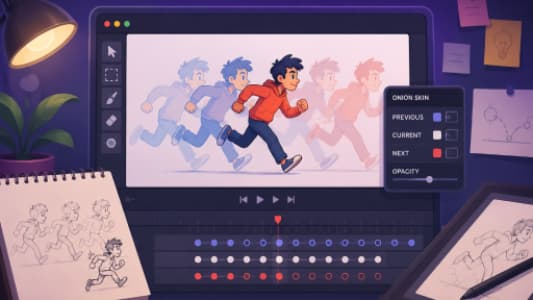
Onion skinning is an animation technique that allows artists to view multiple frames at the same time while working on a new frame. Instead of only seeing the current drawing, animators can see a transparent version of previous and future frames.
The name comes from the appearance of thin onion layers. Just like multiple layers of an onion overlap, animation frames are displayed together in a layered format.
For example, when creating a walking animation, an animator needs to understand how the character’s legs, arms, and body move from one position to another. With onion skinning, they can view:
- The previous position of the character
- The current drawing they are creating
- The upcoming movement position
This makes it easier to create smooth transitions between frames.
Without onion skinning, animators often need to switch back and forth between frames, which slows down production and increases the chances of inconsistent movement.
Why Onion Skinning Is Important for 2D Animation
Creating a high-quality 2D animation requires precision. Every frame must connect naturally with the next one. Even a small mistake in positioning can make a character’s movement look unnatural.
Onion skinning solves this challenge by providing animators with better visual control.
Some important benefits include:
1. Creates Smoother Movements
The biggest advantage of onion skinning is improved motion consistency.
When animators can see previous and upcoming frames, they can adjust character movements more accurately. This helps create:
- Natural walking cycles
- Realistic facial expressions
- Better hand movements
- Smooth camera transitions
For professional animation projects, smooth motion is essential because audiences immediately notice unnatural movements.
2. Saves Animation Production Time
Traditional frame-by-frame animation requires artists to constantly check previous drawings to maintain accuracy.
Onion skinning removes this extra effort.
Animators can quickly compare frames and make adjustments without opening multiple layers or timelines. This speeds up the production process while maintaining quality.
For animation studios working on explainer videos, commercials, educational content, and branded animations, saving production time helps deliver better results efficiently.
3. Improves Character Consistency
Character design consistency is one of the biggest challenges in 2D animation.
A character must look the same throughout an entire animation. Their:
- Face shape
- Body proportions
- Clothing details
- Expressions
- Movement style
must remain consistent.
Onion skinning helps animators maintain these details by allowing them to compare drawings from different frames.
This is especially useful when creating long-form animations where characters appear in multiple scenes.
How Does Onion Skinning Work?
The basic concept behind onion skinning is simple.
An animator creates a frame and activates the onion skin feature in animation software. The software then displays nearby frames with different levels of transparency.
Usually:
- Previous frames appear in one color
- Future frames appear in another color
- The current frame remains fully visible
The animator can then adjust the drawing based on the surrounding movements.
For example:
A character is raising their hand.
Frame 1:
The hand is down.
Frame 2:
The hand starts moving upward.
Frame 3:
The hand reaches the final position.
Using onion skinning, the animator can see all three positions together and create a smooth movement between them.
Onion Skinning in Professional 2D Animation Production
In professional animation production, every movement is carefully planned. Artists do not simply draw random frames; they follow animation principles that create believable motion.
Onion skinning supports several important animation principles, including:
Timing and Spacing
Timing controls how fast or slow an action happens.
Spacing controls the distance between objects in each frame.
Onion skinning allows animators to see spacing differences between frames, helping them create realistic acceleration and deceleration.
Anticipation
Good animation often includes preparation before an action.
For example:
Before a character jumps, their body usually bends downward first.
Onion skinning allows animators to study these preparation movements and create stronger actions.
Follow Through
Objects rarely stop instantly.
Hair, clothing, and body parts continue moving after the main action.
Using onion skinning, animators can maintain natural follow-through movements.
Popular Software That Supports Onion Skinning
Many professional animation tools include onion skinning features. Some commonly used software includes:
Adobe Animate
Adobe Animate is widely used for creating interactive and traditional 2D animations. Its onion skin feature helps artists manage frame-by-frame animation efficiently.
Toon Boom Harmony
Toon Boom Harmony is a popular choice among professional animation studios. It provides advanced tools for character animation and production workflows.
Clip Studio Paint
Many illustrators and animators use Clip Studio Paint because of its powerful drawing features and frame-by-frame animation capabilities.
OpenToonz
OpenToonz is another animation software option that supports traditional animation workflows.
Each software has different tools, but the main purpose remains the same: helping animators create smoother and more accurate movements.
How Onion Skinning Helps Beginners Learn Animation
Learning animation can feel overwhelming because beginners must understand movement, timing, drawing, and storytelling at the same time.
Onion skinning makes the learning process easier.
Beginners can practice:
- Simple bouncing ball animations
- Character walks
- Facial expressions
- Hand gestures
- Body movements
By seeing how one frame connects with another, new animators develop a better understanding of motion.
It also helps students identify mistakes quickly and improve their drawing skills.
Onion Skinning vs Traditional Animation Methods
Before digital animation tools became common, traditional animators used physical methods to achieve similar results.
Artists would place transparent sheets over each other to compare drawings.
Modern onion skinning digitally recreates this process and makes it faster.
Traditional methods required:
- Physical paper layers
- Manual alignment
- More preparation time
Digital onion skinning provides:
- Instant frame comparison
- Easy corrections
- Faster workflow
- Better organization
This advancement has made 2D animation production more efficient for studios and independent artists.
The Role of Onion Skinning in Business Animation
Businesses increasingly use animation to explain products, services, and ideas. From marketing videos to educational content, animation helps companies communicate complex messages in a simple way.
Professional techniques like onion skinning allow animation studios to create polished visuals that maintain audience attention.
At Prolific Studio, we focus on combining artistic creativity with technical expertise to produce animations that support business goals. Our 2D animation services include engaging explainer videos, character animations, motion graphics, and branded visual content designed to connect with audiences.
Whether a company needs an educational animation, promotional video, or storytelling project, strong animation techniques ensure the final result feels professional and memorable.
Tips for Using Onion Skinning Effectively
Although onion skinning is a powerful tool, using it correctly is important.
Here are some helpful tips:
Do Not Show Too Many Frames
Viewing too many previous and future frames can become confusing.
Focus on the frames that directly affect your current movement.
Use It for Key Movements
Onion skinning is especially useful for:
- Character poses
- Facial animation
- Action scenes
- Complex movements
Use it where accuracy matters most.
Combine It With Animation Principles
Onion skinning improves workflow, but it does not replace good animation knowledge.
Understanding:
- Timing
- Weight
- Rhythm
- Movement patterns
is still essential.
How Professional Animation Studios Use Onion Skinning
Animation studios combine creative skills, storytelling, and technical processes to produce high-quality results.
A professional workflow usually includes:
- Concept development
- Character design
- Storyboarding
- Keyframe animation
- Refinement
- Sound design
- Final production
Onion skinning supports the animation stage by helping artists refine movement and maintain consistency.
This attention to detail is what separates basic animation from professional storytelling experiences.
Final Thoughts
Onion skinning is one of the most useful tools available for modern 2D animation. By allowing animators to see previous and upcoming frames, it simplifies the animation process and helps create smoother, more natural movements.
From beginners practicing their first animations to professional studios producing commercial projects, onion skinning improves accuracy, saves time, and enhances creativity.
Animation is not only about making images move; it is about creating experiences that communicate ideas and emotions. With the right techniques and expertise, tools like onion skinning help artists bring stories to life.
At Prolific Studio, we use advanced animation methods and creative storytelling approaches to deliver impactful visual content for brands worldwide. If you are looking for professional 2D animation services, our experienced team can help transform your concepts into engaging animated experiences.