Press jump. If the character takes too long to react, the player will not fault the animator for the mistake. Instead, they will just know that something is wrong with the game. The decision takes only seconds.
Press jump. If your character takes too long to jump, the player will never say, “it’s the animator’s fault” but instead wonder if there’s something wrong with the game.
This decision for a gamer only only takes seconds.
2D animation for games has a harder job than animation for film. The film audience watches. Players play, and the character needs to react, read clearly, and still look good on the five-hundredth repeat. Animation helps players understand what their character is doing and prepares them for enemy actions. At the same time, it creates the attachment.
This guide covers the types of animation required by every 2D character, the influence of art style and production process, and common errors that waste most animators’ time. We rely on our experience at Prolific Studio, where we provided 2D animation services for developers.
Make Your Game World Come Alive!
From expressive character movements to engaging visual storytelling, Prolific Studio creates captivating 2D animations that turn creative concepts into memorable experiences.
Why Animation Works Differently in Games
The players decode movement as information. The shoulder drops before the jump. The shield moves before the block hits. If the movement signals are not clear, the player no longer trusts the controls, and any polishing of the graphics does not fix it.
This is why professional game animations are both a functional craft and an art. Each frame either helps or gets in the way.
Plan the Animation States First
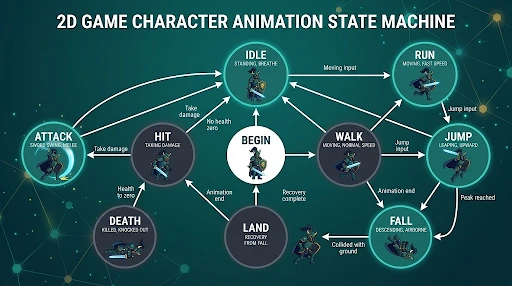
Before drawing any frame, make a list of actions that the character can perform and how one action is related to another. For most 2D games, there will be a requirement of idle, walk, run, jump, fall, land, attack, being attacked, dead, and win states. All these are states, and their transitions are usually what make games feel awkward. A player does not want a sudden transition from idle to a running jump.
According to the Unity Animation State Machine documentation (Unity Technologies, 2026), states, transitions, and events are the basic components that make this logic work. The graph is better drawn on paper first.
The Core Animation Types
Idle, walk, and run
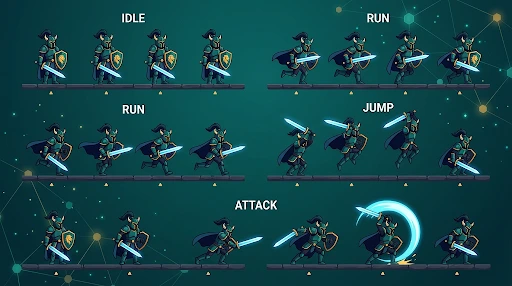
The idling animation is the one players see most and the one that teams always try to get done in time. A character standing like a statue seems broken. The breath, a blink, a shift in weapon hold, the blowing of hair, or a glint of light off a robot show that the character is alive.
Walking animation defines weight and the character’s temperament. The soldier steps with confidence. The zombie drags his leg behind. The kid jumps. If three different characters use the same walking animation, players will notice it even if they do not know why. Our guide to walking animations explains everything you need to know.
Running animation features larger steps, faster arm movement, a steeper forward lean, and greater vertical movement. Players spend hours in this cycle, so it needs to stand out through all the repetitions.
Jump and landing
A jump is not just one animation; it is a series of animations that include preparation with bent knees, takeoff, the peak point in the air, fall, and landing. The squash and stretch technique provides this action with its springiness. We analyze the process in our discussion about jumping animations.
Landing deserves its own animation because it carries information. The heavier character lands differently from a lighter one. The higher he falls, the more compressed the landing should be, along with dust or even the camera shake.
Attack, combo, and damage
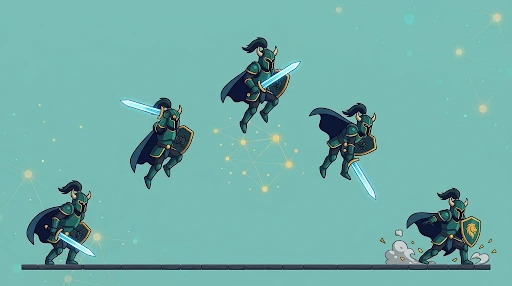
For combat animations, readability comes first before beauty. The player must know the direction of the attack, the time frame, the range, and the time frame when damage is applied. Each attack, be it the swing of the sword, the punch, the spear stab, the magic, or even the bullet, follows an anticipation phase, an impact phase, and a recovery phase.
The combo chains these phases in sequence, like slashing, then spinning, or using a fireball, then doing a dash attack. This can only happen when the transitions are smooth.
On the other hand, damage reactions provide feedback on attacks. Flinching, staggering, getting knocked back, or blocking an attack will depend on how strong the attack was.
Death and victory
Death needs to fit in with the feel of the game. This could be falling forward, crumbling to dust, exploding, or fading into magic. Bosses usually earn longer, multi-stage endings that pay off a hard fight. Victory poses do the exact opposite: holding the sword up, saluting, or dancing a little.
Special abilities and world interactions
Teleports, healing, summoning, and super abilities involve a mixture of both standard animations and particles. The interaction animations are rather basic, but they are very significant. Swimming needs the ripples and splashes effect. Flying includes the rate of wing movement, body tilting, and hovering capabilities. The transitions become more important in this case because a bad transition between climbing and running ruins the whole gameplay experience.
Art Style Sets the Animation Rules
Style is not a coat of paint over the animation. It decides how the animation gets built.
| Style | Reference Game | What It Demands |
| Pixel art | Celeste | Fixed sprite scale, outline weight, and timing grid |
| Inked hand-drawn | Hollow Knight | Strong silhouette; line weight separates hero from scenery |
| Rubber-hose cartoon | Cuphead | Elastic, looping motion and high frame counts |
| Painterly | Ori and the Blind Forest | Effects that never hide platforms or enemies |
| Silhouette | Limbo | Every action is readable as a flat shape |
| Pre-rendered 2D | Hades | A 3D-to-2D pipeline for many directional poses |
| Flat graphic | Night in the Woods | Personality from proportion and timing |
| HD-2D | Octopath Traveler II | Pixel sprites tuned against lit, dimensional scenes |
Choose a Production Method That Fits the Scope
Full-frame animations offer the richest motion and the biggest budget. At 24 frames per second, one minute of animation will require 1,440 frames. On twos, 720 frames are required. Most games do not animate at such frame rates, but the principle is clear: more motion equals more work.
Skeletal rigs differ from this approach: the artist constructs a character as a collection of components, and then works on its skeleton. This method is highly efficient for a large number of characters and reuse across multiple scenes, though basic cutout rigs have a jointed look at the limbs.
Principles That Keep Motion Believable
Classic principles of animation also apply in their game-specific way. Timing determines the responsiveness of the controls. Spacing influences acceleration. Squash, stretch, and follow through contribute to added dynamics and secondary actions, while arcs prevent robotic movement. Exaggeration increases readability in stylized games.
Here comes anticipation, the principle to consider. In a movie, anticipation builds up for the big impact. In a game, it simply slows down the player’s action. Make it fast and clear.
Performance and the Mistakes That Cost Time
Animating beautifully should not slow the game down. Studios make sprite atlases, reusing animation cycles, compressing animation sheets, removing useless frames, sharing skeletons, and keeping textures small.
There are a few mistakes which are common and recognizable:
- Animations that are too long prevent player input.
- Attacks without any kind of anticipation.
- Using only one type of motion for all characters.
- States that have sudden changes.
- Neglecting weight and momentum.
- Bad frame timing.
- Useless details that serve only to bloat the file size.
Where 2D Animation Is Heading
2D is not going away. Teams now combine traditional frame-by-frame art with skeletal rigs, procedural motion, and dynamic effects, while the computer helps with inbetweening and line work. But that key pose will always require human intuition. As indie and mobile game releases continue to increase, animation will remain the key factor in making or breaking the game experience.
How Prolific Studio Approaches 2D Game Animation
Our artists collaborate with developers, designers, and writers to support the motion with mechanics while also enhancing the visual aesthetics. We provide services for character design, cut scenes, combat animations, and character animation, all prepared for use in your engine. This service is suitable for independent developers, startups, game companies, and entertainment brands.
Ready to Animate Your Next Big Idea?
Give your creative vision movement and personality with professional animation. Prolific Studio helps brands transform ideas into polished visuals that capture attention.
Related Articles:
How many frames does a 2D game animation need?
No specific number exists in this case, but style determines a great deal about it. Manual drawing for cartoons requires more drawings than a rigged character does. A reference example would be 720 drawings for film standard animation at a rate of two per second of film. The frame budget should be determined during style testing.
Should I choose skeletal animation or frame-by-frame?
Select frame by frame if the animation is what sells the product, as in an animation of a boss fight that is drawn entirely by hand. Select a skeletal rig if there are many characters and variations. Both of these are often used in video games.
What software and engines are used by animators for 2D games?
The pixel art is done using the following software: Aseprite or Photoshop. Illustration might require a tool like Clip Studio Paint, while skeletal animation will be done with a tool like Spine or Toon Boom Harmony. The engines that work best for sprite animations are Unity and Godot.
How do I stop animations from hurting game performance?
Group sprites into sprite atlases. Compress sprite sheets. Eliminate any frame that does not contribute to the animation of the movement. Use the same rigs for characters that are the same.
Conclusion
Animation is the place where you show your 2D game cares about the player’s time. A readable attack, a realistic landing, and a character pose with personality will speak the same language: “Someone cared about this.” Can your character win over strangers in its first ten seconds?
Need help developing your characters’ movement? Get in touch with Prolific Studio for a free consultation about animation for your game.