A solid storyboard template is the fastest way to turn “I see it in my head” into something your team can actually build. It keeps shots consistent, forces decisions early, and saves you from the classic production pain of figuring out camera and pacing after the work has already started.
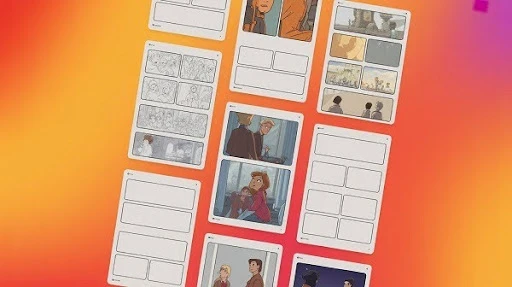
Below are three blank templates (thumbnail, flexible, and production-ready), plus a quick way to pick the right one.
What a Storyboard Is (And What It’s Not)
A storyboard is a sequence of panels that show what the viewer will see, shot by shot, with short notes that explain action, dialogue, and camera intent.
It is not “finished art.” If you try to make it pretty too early, you slow down the thing storyboards are meant to do: solve problems before they get expensive.
Where Storyboards Get Used in Real Projects
Storyboards show up anywhere someone needs alignment before production begins.
Live-Action
A director and cinematographer can use boards to lock the shot list and block the scene before anyone rents gear or books locations.
Animation
An animation team uses boards to plan staging, acting beats, background needs, and transitions. Any 2D animation studio that ships on schedule treats boards like a blueprint, not a suggestion.
Advertising and Marketing
Agencies use boards to sell ideas to clients and keep revisions focused. This is especially true in a video animation agency setting, where multiple stakeholders need to agree on the same story before production begins.
Which Template Should You Use?
Here’s the quick pick table. No overthinking required.
| If You Need… | Use This Template | Why It Works |
| Speed and rhythm | Thumbnail Template | More panels per page, faster iteration |
| A practical “most projects” layout | Flexible Template | Room for notes and dialogue, still quick |
| Production tracking | Professional Template | Shot numbers, audio lines, and clear handoff |
Template 1: Thumbnail Template (Fast Sketching)
This is the one you grab when your goal is momentum. You want to find the sequence, not polish frames.
Best for
- Early ideation
- Action sequences
- Comedy timing
- Quick alternates for a director review
Typical setup
- 12 to 16 panels per page
- No dialogue lines
- Minimal notes
How to use it well
- Draw silhouettes and camera framing only
- Add a tiny arrow for movement if needed
- Keep text short, like “Door slam” or “Close-up reaction”
If you’re storyboarding a 30-second ad, this template is great for getting the whole thing on one page so pacing issues show up immediately.
Template 2: Flexible Template (Notes + Dialogue Without the Bloat)
This is the “everyday” board. It’s still fast, but it gives you space to clarify what matters.
Best for
- Short films
- Social ads
- YouTube content
- Client approvals
Typical setup
- 6 panels per page
- 2 to 4 lines for action notes
- 1 to 3 lines for dialogue or VO
What this template fixes
- Misread intent (people guessing the shot)
- Confusion about the line read or timing
- “We thought the camera was moving” disagreements
If you do a lot of mixed-media work like collage animation, this template is also helpful because you can note texture layers, cutout transitions, or compositing cues right under the panel.
Template 3: Professional Template (Production-Ready)
This is the one you use when the storyboard is going to travel through a pipeline and live longer than one meeting.
Best for
- Multi-scene production
- Teams with multiple artists
- Shots that will be tracked, revised, and handed off
Typical setup
- 3 to 4 panels per page
- Shot number and scene number fields
- Dedicated action and dialogue sections
- Optional fields for lens, camera move, and duration
This template is also a good fit when your board will be translated into an animatic and then into a shot tracker.
A Simple Rule for Writing Notes That People Actually Read
Storyboard notes should answer two questions:
- What happens in the shot?
- What is the viewer supposed to notice?
Bad note: “Character is walking.”
Better note: “Character walks in, scanning the room, nervous.”
Best note: “Character walks in, eyes dart to the open window, then to the phone on the table.”
It’s still short, but it gives the animator and editor a clear target.
How to Fill a Page in 15 Minutes
This is the workflow that keeps storyboarding from turning into procrastination theater.
Step 1: Write a Beat List (3 Minutes)
List the key beats in plain language. Example for a 20-second spot:
- Problem appears
- Character reacts
- Product reveal
- Benefit shown
- Call to action
Step 2: Thumbnail Pass (7 Minutes)
Use Template 1. Draw boxes, stick figures, simple framing. Focus on:
- Shot size changes
- Readable staging
- Clear transitions
Step 3: Notes Pass (5 Minutes)
Switch to Template 2 if needed. Add only what avoids confusion:
- VO line
- Key action
- Camera move if important
That’s it. You can always polish later, but you can’t fix a broken sequence with pretty drawings.
This approach keeps the animation process moving because it gets alignment early without making the storyboard a second full-time job.
Printable Specs for US Letter and A4
A storyboard page fails for one boring reason: the panels are too small to draw in, or the margins get chopped by printers. These specs keep things safe.
US Letter (8.5 x 11 in)
- Margins: 0.5 in on all sides
- Safe header space: 0.6 in (for title, date, version)
- Safe footer space: 0.5 in (for page number, notes)
A4 (210 x 297 mm)
- Margins: 12 to 15 mm all sides
- Safe header: 15 mm
- Safe footer: 12 mm
Paper reality tip: many home printers quietly crop near edges. Keeping generous margins avoids “missing dialogue lines.”
What to Put in Each Box So People Stop Asking You Questions
If your storyboard notes are vague, the board becomes an opinion. That’s when production turns into guesswork.
Use this rule: every panel should tell someone what to draw, what to hear, and what to feel.
Action Line
- What changes on screen, in one sentence.
- Example: “She grabs the map, hesitates, then pockets it.”
Dialogue or VO
- Exact line, or a placeholder that matches timing.
- Example: “VO: ‘You don’t need a bigger budget. You need a plan.’”
Camera Notes
- Only when it matters.
- Example: “Push in,” “Whip pan,” “Hold wide.”
Timing
- A rough count is enough.
- Example: “12f,” “1s,” “Beat.”
This is the difference between “a drawing” and a board a team can build from.
Presentation Board vs Production Board
A presentation board is for winning approval. A production board is for making the thing.
Presentation Board
Use it when you need buy-in from a client or stakeholder who reads visuals more than spreadsheets.
- Cleaner drawings
- Clearer text
- Fewer panels, bigger images
- One takeaway per panel
This is especially common when you’re pitching animated explainer video production services, because the client is buying clarity. If they can’t understand the story from the board, the sale gets shaky.
Production Board
Use it when a team needs to execute.
- Shot numbers
- Versioning
- Notes that answer practical questions
- Room for revisions
If you’ve ever worked with a logo animation company, you already know the trap: clients approve a pretty board, then the team realizes there’s no timing, no transitions, and no audio plan. Presentation boards sell. Production boards ship.
A Simple Way to Storyboard a 30-Second Spot Without Overthinking It
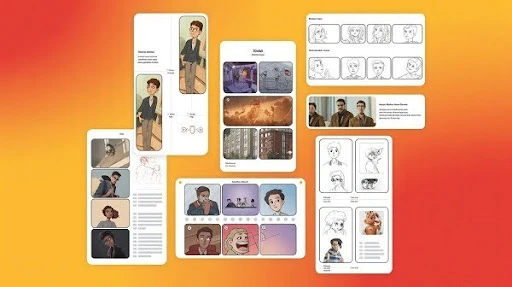
Here’s a structure that keeps you honest. It works for ads, explainers, and short promos.
12-panel backbone
- Cold open problem
- Reaction
- Stakes
- First hint of solution
- Product or service reveal
- Benefit 1
- Benefit 2
- Proof moment
- Social trust or credibility cue
- Objection killer
- Call to action setup
- CTA frame
Why it works: it forces momentum. No wandering. No “we’ll fix it in edit.”
3D Boards Need Different Notes Than 2D Boards
If you’re boarding for 3D, the drawing is only half the job. The other half is describing space.
A 3D animation storyboard should call out camera language and staging more explicitly because depth changes everything.
Add these notes when relevant:
- Lens feel: wide vs tight, and what that does to scale
- Parallax moments: when foreground movement sells depth
- Blocking: where characters are in Z-space, not just left-right
- Camera path: arc, crane, handheld feel, locked-off
A quick trick: if you can’t explain the camera move in one sentence, you probably don’t need it.
Hand-Off Checklist That Prevents Rework
This is the part people skip, then pay for later.
Before a board moves forward, check these boxes:
- Shot numbers are consistent (no duplicates, no missing sequence)
- All dialogue is present (or clearly marked “temp”)
- Every shot has a purpose (setup, reveal, emotion, information)
- Transitions are clear (cut, dissolve, wipe, match cut)
- One page explains the whole piece (a quick overview for anyone joining late)
If you’re building an animatic, add:
- Rough timing per shot
- Temporary VO timing markers
- Music beats if pacing depends on it
This is also where boards turn into the real blueprint for editorial. If a shot’s intent isn’t clear here, it will be expensive later.
Quick Notes for Mixed Media and Collage-Style Shots
If a shot includes photo layers, cutouts, textures, or live-action overlays, add one line that explains the layer stack.
- “Background photo plate, character cutout on top, paper texture overlay.”
- “Real footage base, illustrated UI elements animated on top.”
It takes five seconds and saves someone hours of guessing.
Frequently Asked Questions
Final Words
A storyboard template is useful only when it drives decisions, not when it looks pretty. Print-safe margins keep pages usable. Clear notes keep teams aligned. Presentation boards win approvals, production boards prevent chaos, and 3D boards need spatial notes that 2D boards can sometimes skip.
If your board answers “what we see, what we hear, what matters,” you’re already ahead of most projects.
Related Articles: